Viewing entries in
Software Updates

Very Pinteresting!

Valued Flip Page Clients,  

We are pleased to announce a new dashboard social share option for Flip Page editions - Pinterest. Publishers and readers now have the ability to share a direct link to a page or publication by selecting Pinterest from the Share with a Friend toolbar button. To enable this option, simply click Edit Issue Settings from the dashboard, navigate to Social Networks, and click the "Manage social network settings for this issue" button. In the dialog box that pops-up, uncheck Pinterest and click Save. Lastly, click Save once more on the Edit Issue Settings page -- Pinterest in now enabled for that issue!


Please contact your account representative with any questions.  

New App Feature - The App Banner

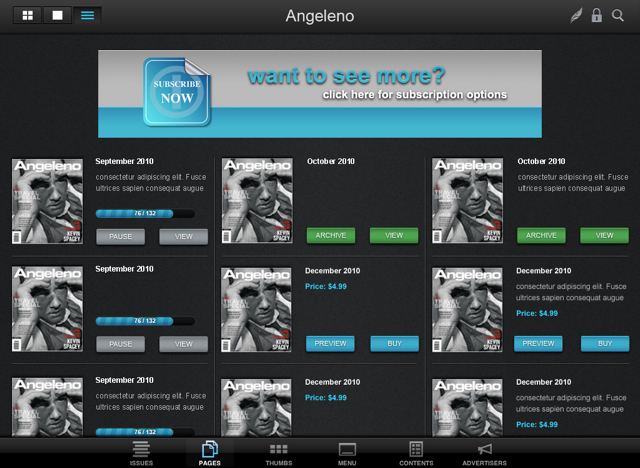
Valued Flip Page Clients, We are pleased to announce a new dashboard feature for Flip Page Apps - App Banner. Publishers now have the ability to add a banner in the Publication Management section of the dashboard, which will populate in the App Cover Gallery. The banner can include a URL link or trigger a login display (URL page cannot contain a link that substitutes in-App purchases). Recommended banner specs in pixels are 710 wide x 140 height (gif, png, or jpeg).

An example of this feature in use can be seen in the screenshot below.

Set up is easy, and we'll provide some tools to help you get started. This should include everything needed to take advantage of this great new feature; however, should you have remaining questions, please feel free to contact your account representative.

New assets needed for Apple Apps!

Valued Flip Page clients, Our Apps Team has been working diligently to service your apps in Apple's app store. Specifically, we have invested time and energy in 3 initiatives that support your app:

- Preparing for the 3.1 release upgrade - Renewing your push notification licenses with Apple (this is a behind the scenes service we perform for each of your apps annually) - Preparing the app program for iOS6 - Apple's soon-to-be-released system upgrade

In order to fulfill the app upgrade and push notification license renewals, Apple is requiring some additional assets for each app for iPad and iPhone. The required assets are listed below. Please email the assets to support@flippubs.com by Friday, August 17th. Upgrades to version 3.1 will occur in the order that assets are received. Apps for which we do not have these assets will continue to be offered in App Store, however, the app will no longer support push notifications and will not receive the 3.1 upgrade.

New specifications - Large Application Icon:  - required for all Apple apps. Only one new icon is required if your app publishes to both iPad and iPhone. The specifications for this icon are now 1024x1024 pixels JPEG or PNG. Do not scale up smaller artwork as it will appear pixelated and blurry.

Apple Newsstand Participants(Only):  New Specifications - Default Cover Art The specifications for this icon are now at least 1024 pixels on its longest side. See below for complete details.

Asset requirements : PNG Format A reasonable facsimile of the cover without representing a specific issue or App icons in use. Asset Size: 1024 pixels or greater on its longest side (iPhone, iPad) Aspect Ratio: Between 1:2 and 2:1

For additional information contact your sales representative!

Got Variable Data? Announcing a new service - On Demand Editions

Valued Flip Page clients, Flip Page is pleased to announce our newest service - On Demand Editions. On Demand Editions utilize the same flip book technology used to deliver magazines and catalogues - but reflect customized content designed for an individual. We take a custom pdf - compiled from your variable data system - and convert it to a flip book that you can then email to the recipient or embed in a PURL.

On Demand Editions are useful for a variety of customized content:

  • Request for Proposals (RFPs)
  • Insurance Benefits Documents
  • Travel itineraries
  • Other types of custom publications

For more information, contact your sales representative!

Flip Page 2D Feature Update

Valued Flip Page Customers,

In April of 2012, The Association of Magazine Media (MPA) released an article that outlined a set of voluntary guidelines to help publishers promote advertising on tablet devices. Also released was a set of recommended tablet metrics and data-released time frames.

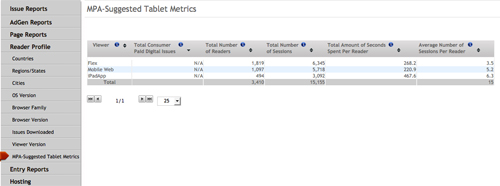
We are pleased to announce that Flip Page has now included these MPA recommended tablet metrics in our analytics suite.  Each report contains a complete historic account of activity and can be accessed by selecting the Reader Profile tab under each account and selecting the subcategory, MPA-Suggested Tablet Metrics.


MPA Suggested Tablet Metrics included in Thermostats™:


  1. Total Number of Readers: The total number of visits by a visitor who had not previously visited this issue during the calendar month.
  2. Total Number of Sessions: The total number of times a user views any page of an issue for the first time in this session. A session begins on the first page view within a given domain and ends after 4 hours of idle time or when another issue is viewed or when cookies are cleared (or blocked).
  3. Total Amount of Seconds Spent Per Reader:  The average number of seconds spent by a Reader per Session. This metric is calculated by summing the difference in time between two consecutive page views so long as that time does not exceed 1 hour. No time is recorded on the last page viewed because there is no subsequent page to measure against. Consequently, if only one page was viewed in a publication, there will be no time recorded for that view.
  4. Average Number of Sessions Per Reader: The 'Total Number of Sessions' divided by the 'Total Number of Readers.'

A sample screen capture can be found below...

Please contact your account representative for more information.

Flip Page 2D Feature Update

Valued Flip Page clients, It is a little early to spill the beans but we will soon be launching a new tool that will integrate Variable Data capabilities with our Flip Page digital editions. If you are unfamiliar with the capabilities of Variable Data printing we suggest you consult with your local printer or you can gather some additional info here. We are excited about the launch of this incredible new direct marketing tool!

Stay tuned for more details!


In App RSS feeds!

Valued Flip Page clients, Do you have an RSS feed that you want to include In App? Or even multiple RSS feeds?

Now you can include direct RSS feeds using the InfoDeck feature of your branded App.

If you are already using the InfoDeck for another website - no problem! The Cover Gallery and Issue InfoDecks now operate independently and can be setup with different site information.

This feature is available to all App versions and does not require an upgrade to take advantage of this too.

Contact your account representative for more information!

The Third Generation iPad and App version 3.0

Many of you have been asking about the New iPad and how Flip Page's Apps perform on this new device. You'll be happy to know that our Apps already look good on the New iPad. You may have read recently that some magazines look pixelated on the New iPad. That's because some Apps are using a JPEG designed for the exact dimensions of the iPad 2. Flip Page has been providing readers with a higher resolution JPEG all along - so right out of the box our Apps look better than they did on the iPad 2.

And yet, this is not the time to rest on our laurels!

Flip Page Announces App 3.0

App 3.0 will serve New iPad readers a crystal clear, full vector zoom pdf - without the initial JPEG, which is no longer necessary given the enhanced performance of the New iPad device. And even better, all of the archive issues will be presented in the same way - without the publisher having to do a thing.

And that is just the beginning of the enhancements we've made to the App. See below for the full announcement, as well as several resources for you in preparation of this new release.

These features are available to readers on the New iPad. Readers on earlier iPad versions will continue to receive content optimized for their device:

Crystal clear display – Your readers will flip through a full vector pdf with startlingly clear text and images. Apple calls the New iPad “Resolutionary” and this App will take full advantage of the color and clarity afforded you by this new device.

Auto update of archive issues – The App now will automatically serve up the full vector pdfs to your back issues as well. So there is no work on your end to apply these features against your older issues. Once again, we’ll do the heavy lifting.

Smaller file size –New iPad readers will appreciate that your App respects their space – storage space that is. Flip Page’s App 3.0 file sizes are actually SMALLER than earlier versions of our iPad App. For comparison, an issue that previously weighed in at 180 MB on the old App will now total about 80 MB's with version 3.0!

Faster download time – Smaller file size = Fewer megabytes to download.

Higher pixel resolution graphics – We were already planning an upgrade to our graphics and we took this opportunity to amp them up even more in App 3.0.

These features are available to all iPad devices:

Enhanced graphics – The New App has an upgraded Cover Gallery and contextual menus

Slide Shows – Slide shows setup in the digital edition now render In App as part of the base service.

Catalog rollovers – Sticky rollovers now render In App.

Download while asleep– No more waking up the iPad to “UnPause” issue downloading. Your screen may go dark but your App is continuing to work in the background delivering that new issue to the reader.

Want more information?

If you already have an App with us, you will receive a free upgrade to the new App. We just need some additional assets and information to we will be upgrading your App to this exciting new version for free.

If you have any questions with regards to the above, please contact your account representative!

Analytics Reporting Update

Valued Flip Page clients, We have changed the operational definition for the data pertaining to 'Total Issue Visits' and 'Monthly Unique Issue Visits' within our analytics reporting.

A new “Daily Unique Issues Visits” metric as been added to reflect a visitors daily interaction with an issue. A daily unique issue visit is considered to be an event that takes place between 12:00AM ET and 11:59PM ET.

Additional information can be found below... Thermostats Update

If you have any questions, please do not hesitate to contact your account representative.

EMail Campaign Reporting Software Update

Valued Flip Page clients, We would like to announce the release of an improved email campaign report style. As part of this update, there are also additional interface enhancements and layout changes. The current report style will continue until midnight on March 25, 2012 and following that time the current style will no longer be accessible and the new report style will be made live to all email clients.

If you have any questions, please do not hesitate to contact your account representative.


Flip Page Publishing Appdate

Effective immediately, Apple has revised the available options for In-App subscriptions. The new terms available for auto-renewing In App subscriptions are as follows : 7 days 1 month 2 month 3 month

The new terms available for non-autorenewing In App subscriptions are as follows :

Single Issue

Apple will no longer accept annual subscriptions or any other subscription duration other than those listed above.

Existing, approved subscriptions will not be affected.

For additional information on Apple's New In App terms please contact your sales representative.

Flip Page 2D Feature Updates

Valued Flip Page clients,

We have added two new features to Flip Page 2D. You now have the following capabilities when creating your publications.

1. Resizable Flipping Icon - You are now able to alter the physical dimensions of the 'Flipping' Icon of the cover page of your icon. This is intended to assist with integration into websites/emails and more.

2 Carousel Thumbnail View - You can now create a carousel style thumbnail view as opposed to a whole page view. The carousel view allows the reader to scroll left to right to navigate various page thumbs while also maintaining maximum viewable display of the Flip edition.

Please contact your Account Representative with any questions.